Frequently Asked Questions
Don't see your question? Contact Us and we'll get right back to you
When checking stock in product selector, click "check availability" within the product card and a drawer will populate asking for your city, state or zip code.
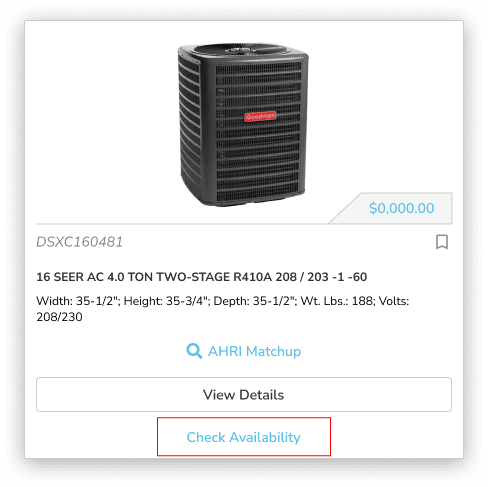
If item is in stock, the stock numbers will show next to the vendor location, highlighted in green.
If item is not in stock or if stock is low, "confirm availability" will show next to the vendor location.
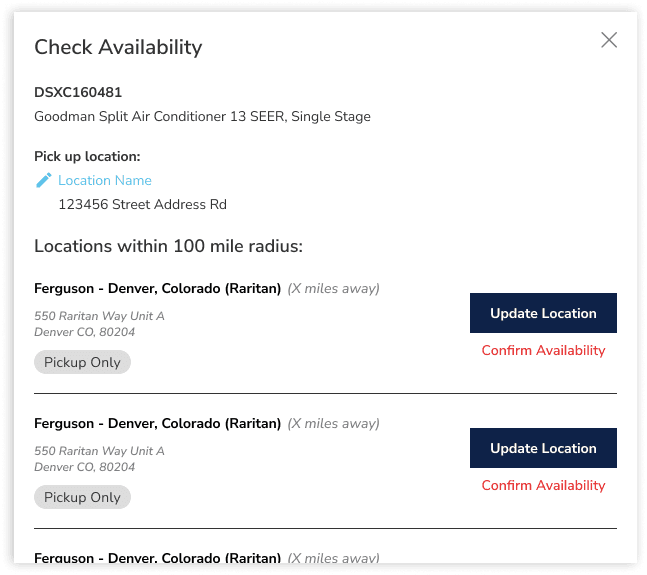
Motili can assist with checking stock manually with vendor.
Navigate to the wrench, on the right side of the top main banner.
Click Products, from the drop down and search product.
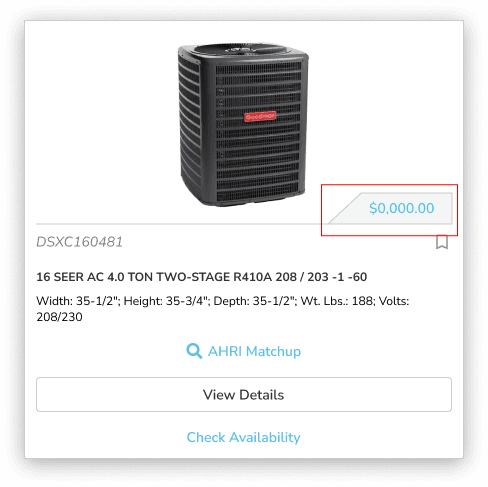
Price can be found on the product card in the lower right hand of the product picture.
If order is in created status, you can add or remove line items from the order.
To remove line items, click gear icon on the line item.
To add line items, click + Add Line Items button and portal will take you to the products page to add items.
If order is in Submitted status or later, Motili can assist with changing line items. If the order hasn't been shipped or picked up.
Tracking can be found on the order page within the Vendor card.
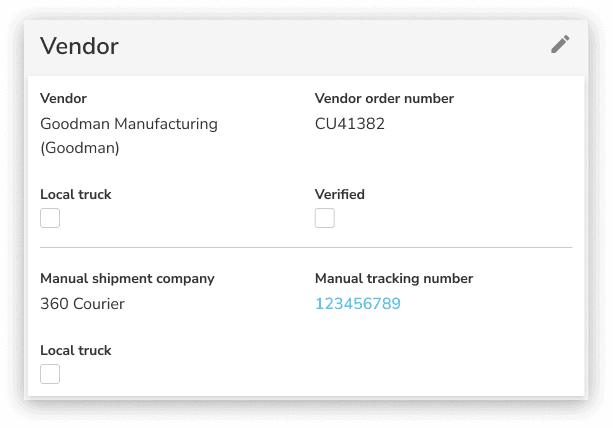
Tracking is hyperlinked to the shippers website. When clicked, user can enter PRO# in shippers website to see if tracking is live and shipping details are populated.
The Local Truck checkbox means when a delivery location is less then 15 miles from a branch the shipment may be delivered by the branch or a local carrier. These types of shipments do not have on-line tracking available.
The Verified checkbox means Motili verifies the tracking information with distribution, ensuring tracking information accuracy.
When order is in "created" status, the fulfillment location or information can be changed by clicking the pencil icon in the Shipping card.
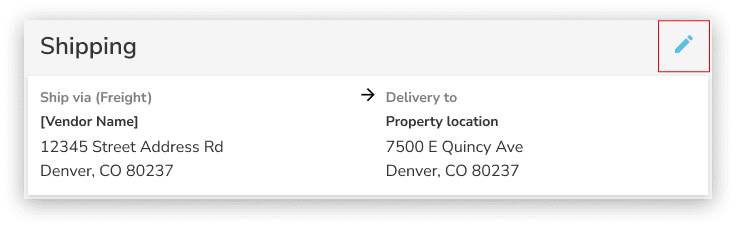
If order is in Submitted or Ordered status, Motili can assist
If order is in Completed or Closed status, this means the order has left the branch and no longer can be edited.
You can remove individual filters by clicking the X next to each applied filter.
To remove everything at once, click Remove All.

You can add your return to the portal by following specific guidelines. Ensure the status of the line item is Completed or Closed, choose a return reason, provide necessary details, and submit the return in the portal. Details needed:
Routine Return - model and serial number of item/s being returned
Damaged Return - Pictures and description of damage. Notated on BOL or was it concealed damage? *Damages should be escalated to a person on the returns team so that they are addressed ASAP*
Warranty Claim - model and serial#, claim# from tech support (for DOA units) or filled out warranty paperwork to give to branch (Repair/Parts)
The status of the line item changes to Returning, and a Returns tab appears in the order document. Motili team will process return and reach out to branch to make sure return is approved. Once approved Motili will send return approval to client/tech. When item returned, and credit is processed, the status changes to Returned.
Once the branch processes the return, they will issue credit to Motili. Motili in turn will issue credit to the client. Process can take anywhere from 5-10 days depending on the issue.
If client/tech has copy of POR (proof of return), they can send to Motili team, team will send to Finance and Finance can expedite credit.
If lost shipment; can ask for a concession from Finance. The concession gives the client credit while we wait for shipment to be found or LTL to give credit.
If equipment is damaged during delivery, tech must notify the carrier driver immediately and document the damage on BOL. Tech should take pictures, if they can. If the shipment is received damaged, the contractor will need to file a claim with the carrier. Contact Motili for assistance with filing damage claims. If delivery is refused, the order should go back to the original branch and Motili will work with branch to file claim.
Check the warranty information by entering the serial number in the warranty check on the Dealer First Mobile site. Replacement parts falling under warranty need to be claimed at the location of the original order that failed unit/part were purchased.
Different processes apply based on the below:
For part replacements, Tech must work with branch to fill out warranty paperwork and do part exchange. (Motili doesn't need to place replacement order for AHS, they have tech use their own accounts)
For DOA units, Unit must have failed within 30days from invoice. Tech support verification is necessary to proceed with a unit replacement. Claim number is MANDATORY. Tech must call: 1-888-593-9988.
Tech or HW will need to set up BOL for return of unit/part
For Water Heaters: tech must work with the brand of water heater to file claim. Ferguson can give the contact information
*Disclaimer: if client is adamant that new order needs to be placed BEFORE warranty claim is approved; please get approval from upper management to proceed. Upper management will need to advise client that if new order is placed before approval, then they will be responsible to pay for unit/part regardless of approval or denial of warranty claim.*
Additional details will be in the Comments section of the order.
When an order has been sent to Motili and is no longer in a created status additional line item adjustments must be done with the order management team. This ensure updates are coordinated with the Vendor branch.